
Flow With It: Personal Workflows App
Why I Made Flow With It
There are tons of Task managers out there, that use all sorts of different ways of doing things based on this or that study. I’ve tried and spent a huge amount of money on a lot of them, but I sit here using none of them. This sorts of makes you wonder why.
Why is it that these apps, that are charging huge monthly subscriptions are not really working for a lot of us. So I decided to try my hand at making my own. What I ended up with is a sort of personal workflow builder.
My Solution

The app, as it stands is very simple. Any Tasks that are in your projects that are ready to be done now are shown on the main page. Here you can move tasks from the Ready section into the Manual wait section. This is handy if your waiting for an email or message from a client so you can get on with the said task.

You can add notes to any of the tasks using the simple note option. The only other options on the dropdown menu are to complete a task, or to put a task on hold/free a task.
Projects
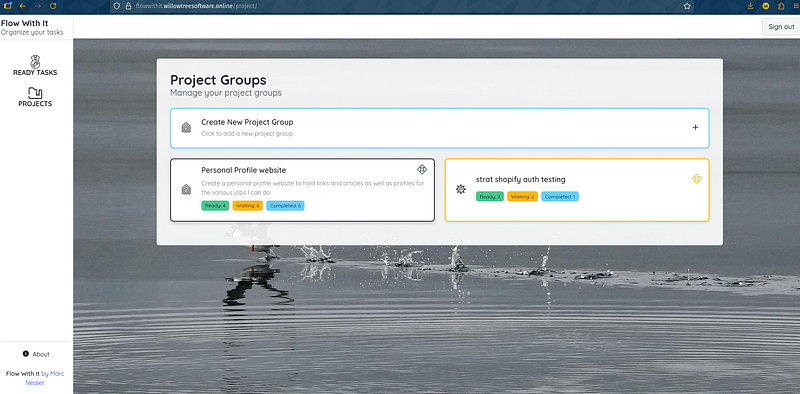
Projects are where you put all your tasks. You can select a colour for a task and an icon from a selection, so that when tasks show up on the main page, its easier to tell which tasks are with which project.
You will also notice that stats on the tasks are show with the project details.
Task Management Screen
Clicking on the tasks dropdown option here takes you to the task management screen.
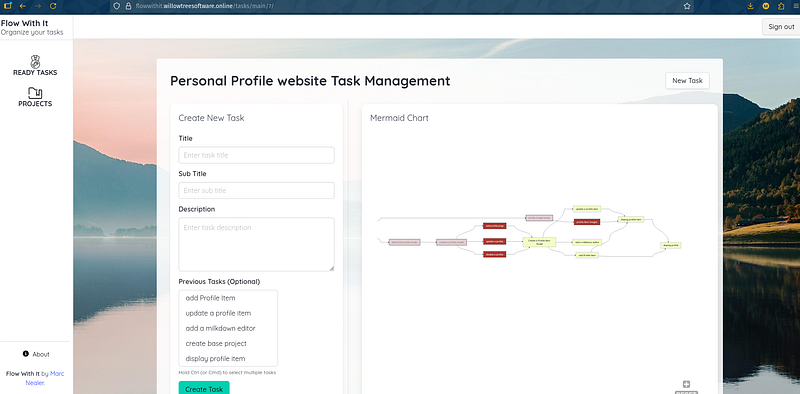
This is a nice clear screen that will let you add tasks to your project, including defining Tasks that must be completed before the task is ready to be done.
You can see that the tasks are displayed in a nice flowchart using mermaid.js. This includes marking the nodes so you can see if the are completed, ready, or waiting.
You will also notice that clicking on a node in the flowchart will display the task details, including notes.
Future Elements for the App
After I finished this section of the app, I realized that it works out as the perfect way to build simple workflows for individuals, but in the current version, there are no ways to save, import or export the workflows, so this is the next step. It would allow you to create an onboarding workflow, for example, and then import and customize the workflow for different clients. It also makes it easy to share with other users.
I would also like to add a simple AI chat command line, so users can create workflows tasks etc by typing in natural language rather than filling in forms.
For dynamic workflows, I do have the basics in place, with the idea that results or an added note would result in changes to future tasks in the workflow. I do want to keep this as simple as possible though. This App is about helping people with simple workflows, and tasks lists that are not date and priority dependent.
The Last elements I would like to add, would be elements for helping people through the day, with systems like habit trackers and diary entries.
About Me and the Why of Flow With It
Flow With It, is not about helping super organized people, who can plan the week ahead, or set what hour of the day they will be doing tasks. Its about helping the messy people with time blindness. Those that can’t really say how long a task will take, or what tasks they are going to be doing when they get up that day.
The UI is made to be calm and simple. Add and manage your tasks without 20 different options on how this is done.
I am Neuro Diverse and I want an App that can really make organization simple and selecting what task to do next as easy as possible.
Feedback Please
This is a simple idea and has a long way to go, I hope. Feedback and help with making it better would be a lot of help. Do please keep in mind that simplicity should be the first and foremost element of this app.