
Building my own Task ToDo app With Django and HTMX. Part I
I have tried MANY todo and personal task managers over the years with some to little success. The best I’ve really used is Amazing Marvin just because it allowed for so many customization that it could be twisted into almost anything. Yet even with that I had a somewhat limited success, and got annoyed with all the features I didn’t want.
So being a coder, I decided to try and build my own one.
Just to be clear, this article is not really about the app, but the tools I am using to create it and how well they worked
My App Idea
I have Time Blindness so setting tasks to do on this day and saying they will take this long, really doesn’t work for me. I also work on my own, so Agile project management, with stuff like sprints etc also don’t work. Kanban boards are ok, but they just end up being a mess when I use them.
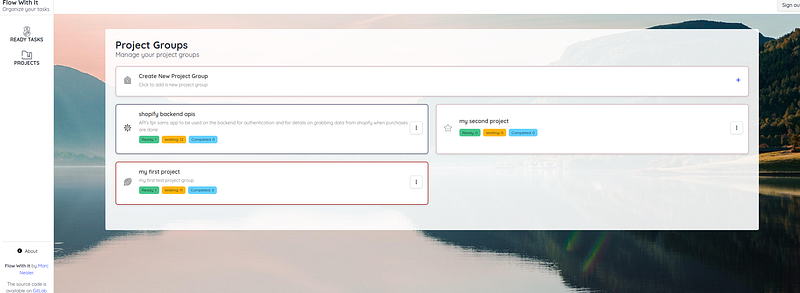
The best route for me is to create a workflow with the ability to alter the flow as I go along. As I complete one task, it will search and see if there are other tasks that I can now do. You have all seen these. Most systems have workflows so that teams can all work on getting a project done, but the products are for teams and the workflow system is somewhat complex. I wanted something simpler and personal. It went through a few different names, but I ended up with Flow With It. For now at least. You create a project, put tasks in the projects and say what is dependent on what. I want. I also want to add additional features where I can split tasks up when I figure out (as I always do) that the task is more complex than I thought. Thus instead of sub-tasks, I can just split up the task.
So basically a personalized DAG Task system
The Technical Stack
I have been working on web applications, mostly with Django for longer than I care to comment on (v1.2 yes the Dinosaurs were dead then, though Jurassic Park was still new). I’ve written a few articles on FastAPI, but for this project, I Really wanted to get into using HTMX and newer Django templating options, so Django 5.2 and HTMX were on the list. I like AsyncIO for coding so the project would run on uvicorn, and I added aio-pika to the mix, as you will know from my articles, I am a fan of rabbitMQ and Celery sucks when it comes to real backend processing (or at least I think so)
For CSS I went with Bulma.io. It looks nice and comes with a very nice set of css Components that I could expand on.
I did add Django AllAuth, but really had a hard time. I don’t like Django Forms. never have, and AllAuth is all Forms driven. I gave up eventually and moved onto Python social Auth. WOW, how much easier was it to use that. I have found time and time again that a project that supposed to do everything for you is really not the best option, and this was a case in point.
I do have a couple of extra packages on the front end. Mermaid.js is a great library for charts and diagrams. I use this to translate tasks and flows into the mermaid language (similiar to plantuml) and mermaid.js creates a SVG. It also allows elements to the clickable, but the functionality is limited. On top of that I have svg-pan-zoom, as mermaid charts always try to fit into the given svg view and they get too small to read.
That’s the main packages. of course I added python-dotenv, factory_boy etc for security and testing, but that's only to be expected.
AI Helpers
I’ve not had a lot of luck with Coding LLM’s, mostly because I work with frameworks like FastAPI, Pydantic, HTMX etc and these are all subject to change and thus in flux. The LLM’s just get muddled with what features work with what version. In a lot of cases, they ignore the version you state and code in whatever they this they should. Try getting code for Bulma 1.04 and they always default back to v0.9.
JetBrains however offered a new solution called Junie and while its not perfect, it does a pretty good job as a Jnr programmer, especially when it comes to doing the grunt work. The best part of Junie is that it takes into account the libraries and software you are using on your project.
That however is a point to note. Junie is a great assistant, but if given too much free reign, it goes wrong. For example, if you ask it make a page using bulma as the css library, it installs v0.9 and works from that. If you install bulmav1.04, it will build pages using that version. This make it MUCH better than just an LLM and it means its actually of use. My CSS skills are not great, but since Junie can go through the Bulma css code and can add to it, it does a great job of extending whats already there.
It should also be noted that Junie is aware of code you have written, so if you have made a load of helper functions, then Junie is aware and will use them.
For me Junie is very useful, BUT its not the smartest. You need to be in control and you need to be able to understand when its does things right and wrong. Your the Snr coder, so you really need to supervise what Junie does.
First Step: Making use of Custom Template Tags
When I took my first steps on this project, I went the usual route of template inheritance and using includes, but as I go further into the project, especially with the use of HTMX, I found this to be of less use. I mean I still use them, but I found that in most cases, creating of a custom tag was much better than an include.
Django has also improved the custom tag system with each version, giving more options and making it easier to make your own tags. I also found that I preferred to use the custom tags over inclusion in a number of cases, using the Django inclusion_tag.
For example, I have an include that will render the card for a task ready to go, I could code like this
{% for task in tasks %}
   {% include "includes/task_ready_card.html" %}
{% endfor %}
Nothing wrong with that and its how we use includes, but I can also do this
{% for task in tasks %}
  {% task_ready_card task %}
{% endfor %}@register.inclusion_tag('includes/task_ready_card.html')
def task_ready_card(task):
return {'task': task}So what’s the big difference. Well when we use the include_tag method, it allows us to add additional code and alter the content being passed to the include template. For example, we could use this to explore the task object and change css classes or text to be displayed, instead of putting all the code into the template. We can also pass additional parameters to the include_tag so make other choices and alter the context before rendering.
Lastly, it just feels nicer, like I have more control. Yes I can add parameters using “with” but you have to admit this looks better.
Lets take a look at another tag I’m using a lot. I decided I wanted to use more customized icons than fontawsome, so I downloaded a lot of free svg icons. I got Junie to push all these into a single file. This is done by copying the xml used for the svg images into the same file and wrapping each in a “symbol” tag, with an id attribute as the name of the icon. I also had to make changes so that I could push color changes onto the icons as well.
So I have all my icons being loaded in a single file, but I had to have special tags to use them. I also had to be able to pass css classes to change colors.
Why did I need to change colors, well for each project in the app, I had the user set a color and an icon for the project, so they could tell them apart. Of course with this in mind I created a set of css classes that would change the border colors for the projects and their task cards. These classes would have no effect on the icons, so I created new css classes that would change the icon colors, but my records only had the project css border class. Thus I created a tag that would generate the html, and make sure the right class was added to change the color of the icon.
@register.simple_tag
def svg_icon(icon_id, color=None):
    if color:
        css_class = color.replace("is-", "has-fill-")
        return format_html(f'<svg class="svg-icon {css_class}"><use href="#{icon_id}"></use></svg>')
    else:
        print("no color sent")
        return format_html(f'<svg class="svg-icon"><use href="#{icon_id}"></use></svg>')
Now i can add an icon from my template like this.
<span class="icon">{% svg_icon "medal-complete" task.group.background_css_class %}</span>These are just some examples, but the Django custom tags continue to be of great use as I work through this project.
First Loads with HTMX
With my initial pages, I went through the usual route of creating base templates and then blocks that I would fill later with templates that would inherit from it. That works fine. It always has and always will, but was it the best approach.
Front end frameworks have worked on the idea that they don’t need to reload the whole page each time, so could I do the same. I had my template with a side menu a header and a main content area. This is where we would normally put the block statements in so they can be filled in via inherited templates. Using HTMX, I did something else.
            <!-- Main Content Area -->
            <div class="column">
                {% include "header.html" %}
                <section class="section">
                    <div class="container">
                        <div class="content-area" id="content-area">
                            <div hx-get="/main/" hx-target="#content-area" hx-swap="innerHTML" hx-trigger="load"></div>
                        </div>
                    </div>
                </section>
            </div>
Note that I will use includes. I mean you don’t want HUGE html templates so they work really well. Yet look at the central div with the hx-get. Instead of an inherited template and I fill the “content-area” I added htmx to go get the default content on load. Django is totally happy with this and I didn’t see any difference in load times. It also gives me a perfect place where I can use htmx to alter the content of the “content-area” without reloading the whole page.
<li>
   <a class="is-flex is-flex-direction-column is-align-items-center m-0 pr-0 pl-0"
       hx-get="/main/" hx-target="#content-area" hx-swap="innerHTML">
      <div class="icon is-medium">{% svg_icon "medal-winner" %}</div>
      <div class="title is-6">READY TASKS</div>
   </a>
</li>
<li>
   <a href="" class="is-flex is-flex-direction-column is-align-items-center m-0 pr-0 pl-0"
       hx-get="/projects/" hx-target="#content-area" hx-swap="innerHTML">
      <div class="icon is-medium">{% svg_icon "folder-and-ribbon" %}</div>
      <div class="title is-6">PROJECTS</div>
   </a>
</li>
Thus I have the start of a Single Page App. No huge frontend frameworks.
Conclusion of Part I
First off, I’ve got to say I felt comfortable using Django again. Making better use of Custom tags really helps with this project and I have made and used a lot more than this. I do wish they would spend more time making Django Async. It kinda feels half hearted at this stage. The psycopg fully supports async calls, but the ORM is still not quite there. Also after using Tortoise ORM, it feels clunky and a little old fashioned. I also miss the dependency injections and easy to build middleware of FastAPI. It would be really nice if I could send form data to a Pydantic model, before starting the view. That said, Django does a good job and the modules you can add, still make it a top choice. I do recommend using smaller and more modern addons though. Django AllAuth just didn’t fit and felt old and clunky. Python Social Auth was a great fit though. With an app format set using Bulma, Junie did all the work for the signup and signin pages.
Bulma hypes its column layout system, but as I progress with this project, I’m finding the flexbox system a better choice. That said, Bulma gives three choices of layout systems, which is pretty flexible, along with some layout components. There are however some components missing from its menu. Its not really added many new ones. I would like to see more. Junie has helped make some of them for me though.
HTMX is really meeting all my expectations. I am constantly surprised at it flexibility and ease of use. Most don’t see using Django for rendering html snippets, but it does this without complaint, thus slides into being used with htmx without ANY mods. The HTMX/Django pairing does mean a change in thinking though for old Django hands.
Junie has been a lot of help, but its a learning curve to use it properly. Ask for too much and you get crud. Don’t give enough detail and it starts filling in the blanks. There is a small middle ground where Junie does a fab job. but finding that ground is often difficult. When you do, it really helps a lot. Just remember that you need to be in charge of decisions. Don’t let Junie do it for you.