
Use aio-pika instead of Celery for Django and FastAPI
I’ve written a few article on this subject already, but I thought one more to make my point very clear would be a good idea.
Background task managers used for frameworks like Django and FastAPI, are really just wrappers around dealing with a message broker. They allow you to mark a bit of code to say its background and in some cases allow for scheduling, but that is still wrapping around a broker. I mean, to use any of them, you need to install a broker. My advice, go directly to the source.
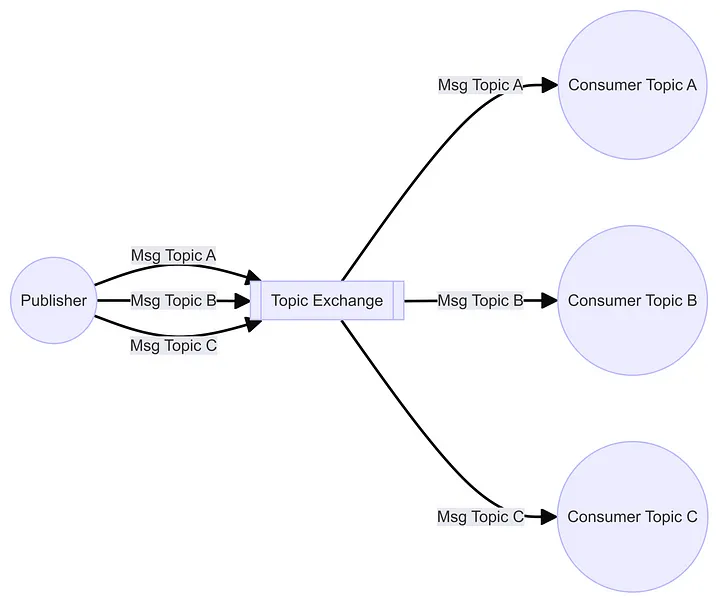
So your saying to yourself “Message Brokers are odd. They have a strange language and its yet another thing I have to learn”. Well, with a little reading Message Brokers are really not that complex. Take the Topic exchange above. Here you just send messages to the broker, with a Routing code. This is like a post box number. In another process, you link to the Broker and say give me messages from this box number. Beyond the basic, you can get more than one process going to get messages from the box number, and you can also say how many messages the process can get from the box number at any one time. Lastly, you can deal with processes that crash, but the message is important, so it has to be passed on.
All of this is there, waiting for you to use it.
I would also like to make another point. Celery and other Task managers are really not that easy to set-up. You need to define workers, where task are, when they can run, and a lot of other stuff. If you deal with the Message brokers and the processes directly, you will know and understand what you are doing. Its not being hidden behind other code trying to make like easy for you and in most cases not.
Consumers
Message Brokers can work in other ways, but the most common, by a long way is the publisher — consumer model. That means one process sends a message, and another fetches a message. The two never link together and the publisher is not waiting for a reply.
So lets take a look at a Consumer.
import asyncio
import aio_pika
import json


async def process_message(message: aio_pika.abc.AbstractIncomingMessage) -> None:
    async with message.process():
        msg = message.body.decode()
        data = json.loads(msg)
        print(data)
        await asyncio.sleep(1)


async def main() -> None:
    conn = await aio_pika.connect_robust("amqp://guest:guest@127.0.0.1/")

    channel = await conn.channel()
    exchange = await channel.declare_exchange("test_exchange", type="topic")
    queue = await channel.declare_queue()
    await queue.bind(exchange, routing_key="routine1_json")
    await queue.bind(exchange, routing_key="routine2_json")
    await queue.consume(process_message)

    try:
        await asyncio.Future()
    finally:
        await conn.close()


if __name__ == "__main__":
    asyncio.run(main())
First thing to note is that I’m using Async processing here, thus aio-pika, instead of Pika. Secondly, the references to “queue” has no relevance to your idea of a “queue” in python. Here is just part of the connection.
The important part of the code is that its linking to an exchange (sort of like the post office), then asking for messages marked as “routine1_json” and “routine2_json”. A point to note here is that I could have started 4–5 consumers inside of tasks that I would then start in main(), thus inside one processes, I would have 4–5 async threads running. Also note that when a message comes in, its passed to another function. This is quite common in async coding with systems like this. No need for loops.
Publishers
Unlike the Consumer, a publisher just sends a message and ends. There’s no hanging around to see what happened to the message, other than a response from the broker to say it got the message.
import asyncio
import aio_pika
import json


async def main() -> None:
    conn = await aio_pika.connect_robust("amqp://guest:guest@127.0.0.1/")

    async with conn:
        routing_key = "test_json_topic"

        channel = await conn.channel()
        data = json.dumps({"message": "Hello World!", "detail": "example json"}).encode()
        exchange = await channel.declare_exchange("test_exchange", type="topic")
        await exchange.publish(aio_pika.Message(body=data), routing_key=routing_key)

if __name__ == "__main__":
    asyncio.run(main())
This runs super fast, so you can call the routine from inside your views without an issue. We just make up a text string and send it to the exchange with a routing key. Done!!
Do note that the publisher doesn’t say who it is. There is no message from, just where the messages is to go to.
Comparing to Task Managers
With a task manager, you mark functions in your code that are to be run in the background. Workers are then started waiting for messages to tell then what task to run. This is great when you have a lot of different small tasks. I’ve found that this isn’t the case. Quite often there are just a couple of tasks to run in the background, and in some cases, they can be very complex, long running, and/or cpu intensive.
In most of these, it would also be better to separate the code bases. You might also want to control when, how many and where these tasks are run. Dealing directly with the Message broker works much better for this. You can create lots of exchanges with messages with different routing keys. You can stop processing messages on a queue by simply making the process sleep, or ensuring the queue is not deleted if the process is stopped.
Going beyond background Tasks
Imagine you have a system where you have 20 applications and you want messages from all of them to go back to a central app. Your thinking this is easy since you just send the results to an API endpoint of the central app.
So here are a couple of things you might not have thought about.
The central app is secured away from the other applications and they are not allowed to make calls to the API end points on the app.
The location (ip address etc) might change on the central app, and you can’t hard code it into the 20 applications.
The central app has to process messages in order, to stop race conditions.
If we use a message broker we can resolve all these issues.
Place the message broker server in a place the 20 apps can access. They can then send their messages there. The central app reaches out to fetch messages from the broker, so the firewall is not an issue, as long as the consumer is within the firewall.
Using a Message Broker, the 20 apps won’t care about the address of the central server, only the Message brokers address. At the same time, if the central app is moved, it makes no difference because it too, only cares about the address of the message broker, not where it is.
We can have 100’s of messages being published to a message broker and it will be ok. The central app Consumer just makes one connection and pulls the messages in one at a time. This doubles up as a way of throttling messages going into the central app, protecting it from being overwhelmed. This process can also be used to load balance messages coming in as well.
Conclusion
If your dealing with data intensive applications, load balancing, work distribution and throttling are critical features. Background Task managers really can’t deal with that sort of work, whereas a message broker like RabbitMQ is built for it. Learning to use the brokers directly is a way of future proofing your applications and allowing then to be much more scalable.