
Python Recursive Functions: Extracting data from JavaScript/JSON blobs
Before we get into the whole thing of Recursive functions, let me explain the problem I solved using this.
I had to scrape a bunch of sites, where a lot of them have json data encoded into JavaScript code. We could do a lot of text manipulation to make the JSON functional to gain access to the data, but the majority of the time, its very hard to tell what is Javascript and what is json. The code would be something of an ugly mess.
I’ve used a page from a pet food shop as an example. I’ve also copied the page into a github repository, so you can take your time reviewing and have access to the code I will show today.
For this page, there are a number of options the user can select from, based on size. You will have come across others, where color flavor etc would also be options. The details on the different options are passed to the page in a script tag, holding JavaScript, with an argument for a function, being some json. Search on “jsonConfig” and you can see the data.
This script blob is a mess and contains lots of different arguments containing different json strings and can even include bits of html. There in the middle of all of this, is the data you want, but how can we get this out!!
Lets take a simpler example to show what I mean
<!DOCTYPE html>
<html lang="en">
<head>
    <meta charset="UTF-8">
    <title>Title</title>
</head>
<body>
<script>
  let my_data = [1,5,'{"test1":[5,6,7,{"test2}]}', 'some text here', '{"test7":[]}'];let mydata2 = '{"test3":"15"}';
</script>

</body>
</html>
we cans see the json here and its pretty obvious, but we have to deal with the fact that parameters will change and the formats for the json are not set and could have more levels to them than shown here. This means we can’t easily define the start and end point in the text we get to grab the json string.
What we need to be able to do is detect where the opening bracket of the json starts, and keep pulling to we get to the matching end bracket. Even now, your thinking of counters, various loops etc to try and sort this out. A Recursive function makes this somewhat easier though.
What are Recursive Functions
A recursive function is a function that calls itself. This is considered part of functional programming, with some languages using this instead of loops.
Here is a standard example of a recursive function
def recursive_sum(numbers:list) -> int:
    if len(numbers) == 1:
        return numbers[0]
    else:
        return recursive_sum(numbers[1:]) + numbers[0]

if __name__ == '__main__':
    result = recursive_sum([5,6,7,8,9,10])
    print(result)
They are sort of split into two parts. Part one is the point where the recursion stops, and part two is where we call the function again.
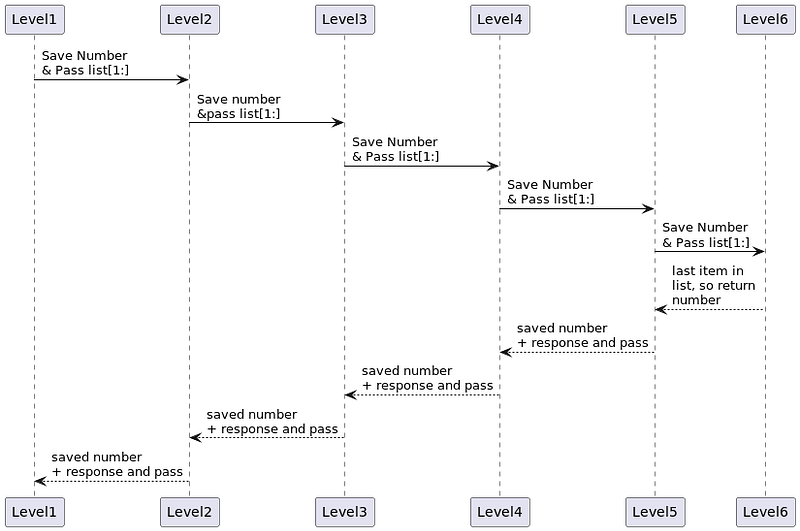
This example is not one I think you should use. There are way better ways of doing this, but it shows how recursive functions work and they can replace loops. You can see from the sequence diagram this is a straight recursive call.
You should note that python has a 10,000 recursive depth limit set. That means it will crash if your function calls itself 10,000 times. Using recursive function in place of simple loops is not a good idea
A better use of a Recursive Function
A better use of a recursive function is to move through tree like data structures. The example above just goes through a list, going in a straight recursive line, but the function can easily go up and down, pulling data out, for example searching through a tree compile a string or list.
Here is my code for pulling data out of those JavaScript blobs.
def find_close_bracket(val, root=False):
    placement = 0
    while placement < len(val) and len(val) > 0:
        if val[placement] in ["[", "{"]:
            placement += find_close_bracket(val[placement+1:])
        elif val[placement] in ["}", "]"]:
            return placement+1
        placement += 1
        if root:
            break
    return placement
I will warn that my code will expect to find a bracket as the first character in the string passed to it. So what is happening here.
Well the code is going through the string 1 character at a time. When it sees a [ or { , it calls itself. It keeps a record of how many characters its scanned before it gets to a bracket. So each time it sees an open bracket, it acts like its found an branch and moves down the tree.
When it finds a closed bracket it moves up the tree, passing back the number of characters its processed. This way, its keeping track of the number of characters its passed through examining the string.

This pattern is not straight. The recursions go up and down as they follow the brackets. The diagram shows 5 levels, but remember each arrow right, results in a new function being created and each arrow left is that function returning results and finishing. Thus 5 levels is just for this diagram. This could be less or more. It will also adapt to different depths depending on the entered data.
The format of the recursive function also has the two elements I talked about before. The code to start a new recursion, and the code to return a value.
If you were to use loops, you would have to set some sort hard coded limit of the depth, but with recursion you don’t. It just adapts to what it needs
Rest of the JSON extract code
For this code, I need to have a clear indicator as to when I should start and stop reading the characters. To start reading, the first character has to be an open bracket, which will start the next recursion level. To stop reading, I needed to know when the results got returned to the initial function. To deal with this, I created a parameter called “root” which is true only for the first level of the recursion, thus, when control is eventually returned it knows its the end of the line and to finish.
The function below is wrapped around the recursion function. it allows you to set the point in the string you want to split the string and start reading, as well as unescaping the relevant characters that were added when it escaped before being added to the html.
def process_json(blob, key):
    blob = html.unescape(blob)
    blob = blob.replace('\\', '')
    if len(blob.split(key)) > 1:
        data = blob.split(key,1)[1].strip()
        end = find_close_bracket(data, root=True)
        try:
            return json.loads(data[:end])
        except ValueError:
            return data[:end]
    else:
        return None
Why use a Recursive function on this.
If we try to code such a system using loops, it would end up being very complex, and we would have to set levels of the depth we could go when it comes to the data. Trying this will make your head hurt. The recursive function is adaptive and much simpler to code.
The same concept is very versatile. In another library I wrote, Python-icd10, icd10 diagnoses codes are embedded inside each other, and these need to be flattened out. The data is in XML, and this is very common with such data structures, thus I have a method that will call itself when it finds a set of codes inside another set of codes.
In another example, I am going through pages with pagination from a website. I could just have a loop adding 1 to the page count, but the following works a little better I think. This is something like a loop, but I think in this case, its just a little tidier.
    async def get_page(self, url):
        this_url =f"{url}?=p{self.page}"
        text = await self._get_webpage_(this_url)
        if text:
            products = await self.get_product_urls(BeautifulSoup(text, "html.parser"))
            if products:
                self.page += 1
                await self.get_page(url)
Conclusion
Recursive functions are not the easiest concept to get your head around, but when you do, you will never look back. There are lots of instances where they should not be used and should never be seen as a direct replacement for loops, but in other cases, like the ones shown here, they do a far better job than loops do.
If you end up trying to code work where your writing loops with loops within loops, with counters on this and that, rethink what your doing. A Recursive function can replace a mess of loops and counters with much simpler and more compact code.