
Web Development: Custom Backend Task Manager
With web applications, we all have to write fast acting views that turn around tasks as quickly as possible, thus we have a need to push selected tasks to run outside of our application. We call these Backend Tasks.
On the Python side, there are a number of options with Celery being top of the list. For all of these, you need to install a system to work as a message broker. The two main choices used are Redis and RabbitMQ.
Redis is a NoSQL key, value database. It can be used in a lot of different ways, including being a very simple message broker. This can be a good choice for a web application, as Redis can also be used a a cache.
RabbitMQ is a totally different type of system, and the one I am going to talk about here. It’s a dedicated Message Broker. There are not many of them out there and RabbitMQ and Apache Keras are the leaders.
What is a Message Broker?
Message Brokers work on the basic pattern of Publishers and Consumers. Publishers are events that publish or send out a message. Consumers are applications or tasks that connect to the message broker and wait for a message to turn up. They then do something with that message.
There are a number of things that happen between a message being sent and a message being consumed though. The Message broker moves messages around, deciding which consumers will get which messages, and manages situations where a consumer task has crashed and messages need to be redirected.
There is an important point to make here. As stated the brokers, by default use the Publisher and Consumer pattern. This means there is not direct connection between the Publisher and Consumer. Communication goes one way. This is not a socket or RPC call.
A Queue is not a Queue
When you start using a message broker, it starts talking about a queue, how this is set-up and works. The problem is the message brokers concept of a queue is not the same as a programmers concept of a queue.
Queues in a Message broker are only used by Consumers and they are used to identify the messages the Consumer is supposed to get. They connect to an object called an exchange. Its best to think of the exchange as a postal sorting office and the queues as the pigeon holes the messages go into, waiting to be delivered.
Exchanges
When messages are published, they get sent to an exchange, and have an address of sorts called a routing key. There are different types of exchanges and just like a postal system, exchanges can be connected to other exchanges, as well as queues. This combination of exchanges and queues, allows for lots of different ways that messages can be routed and consumed.
Direct Exchanges (Default Exchange)
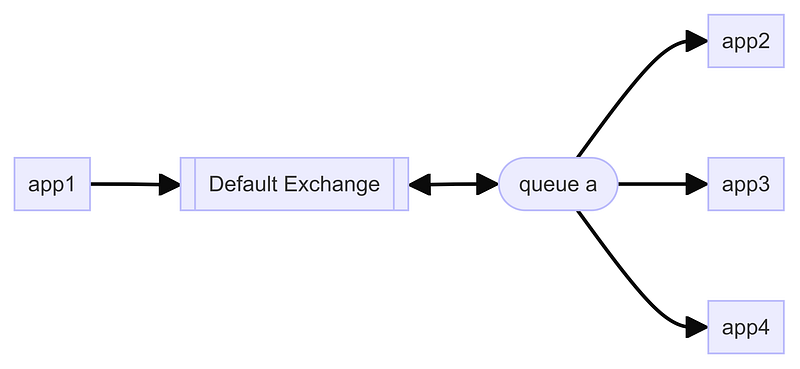
A direct exchange is set-up when RabbitMQ is installed, and labeled as the default exchange. The routing key applied to messages are set-up to match the name of the queue that will be waiting to deliver the message. So a direct delivery of a message with a given routing key to a queue with the name matching the routing key.

You can have more than one consumer linked to a queue. The exchange and Queue manage who has got what messages and ensures the same message does not get delivered twice.
ACKNOWLEDGING MESSAGES
Before we move on, we should talk about what happens when a message is consumed. The Exchange/Queue knows which messages have been delivered to which consumer. It marks those messages as currently be processed by that consumer. There is then an acknowledgement signal that needs to be sent by the consumer to the exchange, so the exchange knows the message has been delivered and processed.
The default is to acknowledge the message as its read in by the consumer, but there will be situations where you don’t want this, so acknowledging the message can be done at the end of your task.
YOU MUST ACKNOWLEDGE A MESSAGE
If the message is not acknowledged in a set time period (2 minutes default) then its status is changed so it can be consumed by another consumer. Thus not acknowledging a message results in it being processed again and again.
Topic exchanges
Topic Exchanges are very similar to Direct exchanges, except in how the Queues are set-up. The queue name or identification has nothing to do with the routing key assigned to the queue. Messages are linked to a queue only based on the routing key and nothing else.
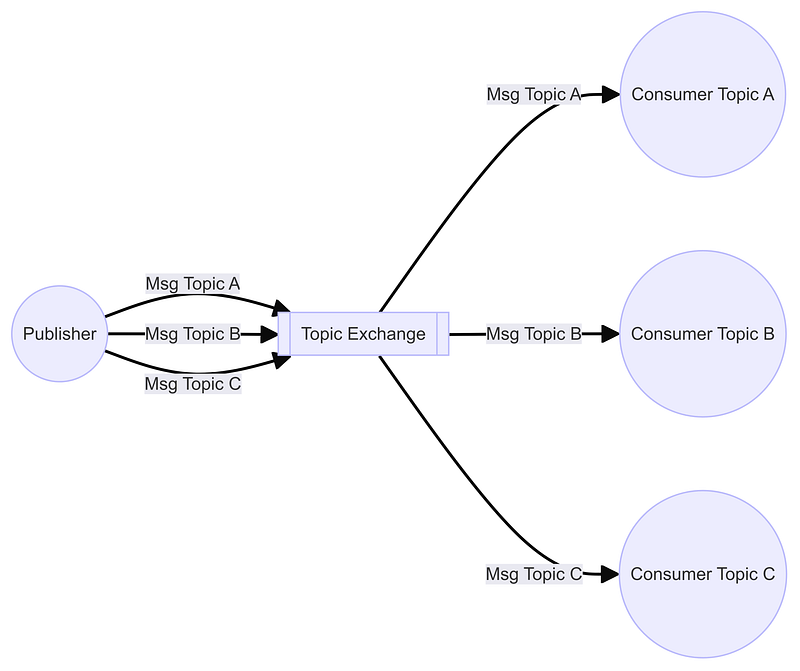
These are going to be the most used types of exchanges.
Fanout Exchanges
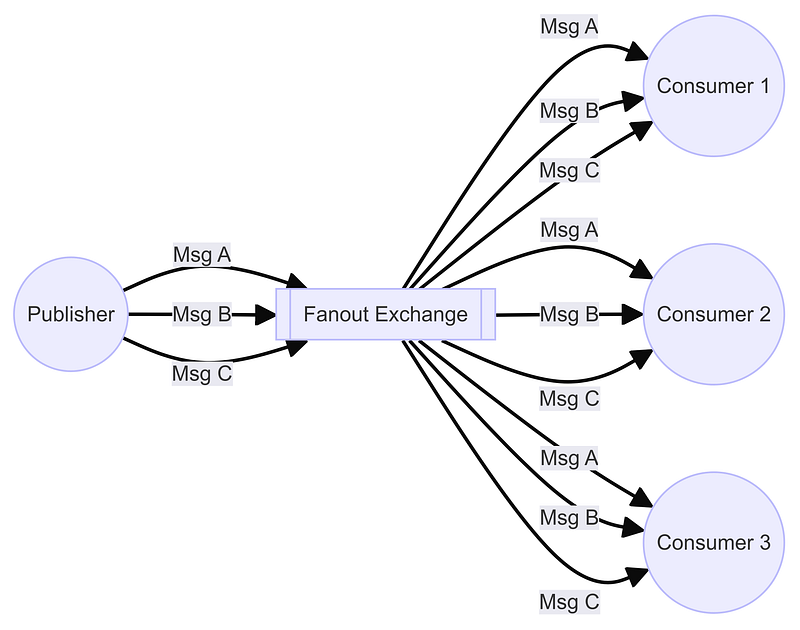
Fanout exchanges makes sure that all messages are delivered to all consumers. This means it keeps a record of which consumer has processed each message and ensures that each one will get a copy of the message only once. The message is removed once all consumers have consumed the message.
Binding exchanges to exchanges
Linking an exchange to a queue or another exchange, is known as binding. There are situations where you might want to bind exchanges to exchanges. For example, if a message with a set routing key is sent to a Topic exchange, it could be sent on to a fanout exchange so it can be delivered to multiple consumers. This is a rather advanced topic and not one I have ever had to use, but its best to understand its there.
Conclusion
Message Brokers are powerful tools, especially in distributed environments. Task Managers like celery only use the basics of what they can do. The rest remains unused. I do find this odd, especially when coding to use a message broker like RabbitMQ is not difficult. I think its simpler than setting up the task managers, as you will see in my next article.