
FastAPI for Django Programmers: Getting started with a Good Project Structure.
I’ve been coding Python and Django for an embarrassing long time, and like a lot of coders, I keep an eye on new and upcoming libraries and systems. FastAPI is a Python web framework, which I think is going to be a major contender in the Web framework world. It’s already popular and growing in popularity.
Django remains strong and I think will remain the Number One framework. FastAPI however, works in a very different way from Django, and one I like. It is a micro framework of sorts, so unlike Django, it doesn’t come with things like an ORM, authentication modules and session management, but its not a bare bones, nothing extra one like Flask. It has a wonderful set of functions that make it stand out. So what I’m going to go through here, is how to add those critical items, that all Django coders need, to FastAPI and go through some of those extra features mentioned.
So, very quickly, what’s so special about FastAPI?
First off, FastAPi is fully Async. Django allows for some Async views and this has improved in Django 5.0, but it’s not 100% async and does not allow for items like websockets, without adding additional modules. FastAPI allows for async view, websockets and even running jobs in the background, without adding any other modules.
Next is the use of Pydantic and Annotations. FastAPI is all wrapped up in Pydantic and the need for type annotations. They are a must. This makes coding in IDE’s much easier and documentation writing simpler. If you have not used Pydantic already, then your in for a treat. Its a wonderful library that can be used to validate and serialize data, but unlike DRF serializers, it uses, python Typing annotations.
The last Item I’m going to mention here, is dependency injections and middleware. FastAPI makes it VERY easy to use and make both. Dependency injections are great and allow you to extend the framework with all sorts of addon’s that can be passed from project to project.
The use of Pydantic, annotations and Dependency Injections, make the path parameters for views, look very different from Django. Query data, path parameters, Body data, and form data all need to be defined in the view parameters and are also validated there. This makes for cleaner code and allows AI assistants create better documentation for the views.
What’s the Catch?
As I mentioned earlier, FastAPI does not come with all the goodies that Django has, thus the reason for my writing these docs. I’m going to write a series of them covering topics such as
- Managing Project Layouts
- Adding and using an ORM
- Managing and Generating HTML responses
- Dependency Injection and how this helps with Authentication and Session Management
- Creation of Middleware.
- Online documentation
So onto my first topic.
Project Layout
Django lets you create a project and then add apps to your project, all with a nicely laid out structure. This is a great feature and one missing in frameworks like FastAPI, Flask etc. That said, creating a nice project layout with FastAPI is very simple.
No one’s mentioned static file management yet!
I know some will disagree with me here, but I really don’t like Static file management in Django. It seems to cause all sorts of issues, and is there as a work around for Django’s concepts of Apps and add on modules. Since FastAPI doesn’t have Apps, and modules are not added like this, we don’t need static file management. There is a class that allows us to load static file, when testing, i.e., FastAPI serving static files instead of your proxy server, but that’s as far as it goes, so don’t get worried when I don’t start adding static directories all the over the place.
Application Starting Point
With Django, the entry, or starting point of your app is defined for you in the project folder, along with settings etc. With FastAPI, we have to create a file and object that is the starting point of our application. This is very easy to do. Place the following in a file called main.py (or whatever you want to call it)
from fastapi import FastAPI

app = FastAPI()

@app.get("/hello")
async def hello():
    return {"result":"hello"}
Now to start your app, use the following command
python -m uvicorn main:app --reloadWe are using Uvicorn instead of Gunicorn and we just state file:app_name as an argument. If you don’t know, Uvicorn is the Async version (sort of) of Gunicorn.
To be clear, the code above is an example, and I don’t recommend coding views in main.py, or whatever you call it. This file works perfectly as a settings file, so keep it as such
From this you can see our starting point is really the FastAPI Object, so when we add more sections to our project, at some point, they have to be attached to this object.
Creating your view files and app directories.
Below is an example of the sort of structure that, I think, works best for a FastAPI project.
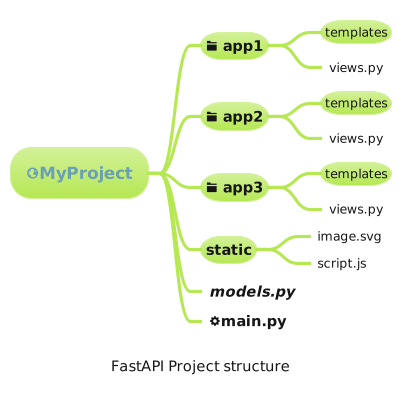
Firstly, you will notice that I have created only one static folder. As mentioned, no static file management is needed, so no need to place static file folders in each app directory. In fact, it will make things more complex and not really add any benefits.
I have also placed the models.py file in the base. You can create model files in each app, and these can be connected and used with no problem. It’s just that in most projects, the division of use, when it comes to models, is not always clear, so I decided that having all models in one place would be better.
So, how do we connect out views to main:app
FastAPI makes this simple using the APIRouter Class. This class works like a smaller version of the FastAPI class. We create an object and assign views to it. Then, we just include the APIRouter object, into our FastAPI object.
from fastapi import APIRouter

app1 = APIRouter(prefix="/app1")

@app1.get("/hello")
async def hello():
    return {"result":"hello"}
Using an API router, we have the option to add a prefix. This works like pulling in urls with an include statement, where we can add a prefix in the path statement, or we can state the full urls in the included urls file. I think adding a prefix is the better option.
from fastapi import FastAPI
from app1.views import app1

app = FastAPI()
app.include_router(app1)
So in the main.py file, we just import the APIRouter object and use the include_router() method to add it to the project.
Tip: Remember you have to import all your APIRouter objects into main.py, so its best to make sure their name are either unique, or use import as.
Tip: APIRouter() is not FastAPI(). I have seem many people try and use them like they are the same. They have VERY similar feature, but are not the same. Don’t get confused here
Mounting Static Files
Just like with Django, you shouldn’t be serving static files in a deployed environment, but they do need to be there when you start the server for testing. Below is the main.py file with the code needed for Static file mounting.
import os
from fastapi import FastAPI
from fastapi.staticfiles import StaticFiles
from app1.views import app1

file_path = os.path.dirname(__file__)
static_dir = os.path.join(file_path, "static")

app = FastAPI()

# I modifed this line as it does not appear to work well if you don't state
# a mulri tier directory path. i.e directory="static" doesn't seem to work
app.mount("/static", StaticFiles(directory=static_dir), name="static")


app.include_router(app1)
The mount() method is a very interesting feature. I’m not going to go through it here, but it can be used to mount another project at a given point inside of this one. thus you can have 2–3 FastAPI projects, that are independent of each other, all being delivered by the same server. It also says that you can mount Django and other framework projects, but I’m not tried that. You should take note of the word “independent”. This means that while the projects are delivering endpoints on the same server, there is no interaction between the code bases, so don’t confuse this with the concept of projects and pass.
This gets me started, but what about the rest?
In my next posting, in this series, I’m going to go into getting an ORM set-up, and I’m NOT using SQLAlchemy!!